
magicm3n
-
Постов
5767 -
Зарегистрирован
-
Посещение
-
Победитель дней
69
Тип контента
Профили
Форумы
События
Блоги
Магазин
Весь контент magicm3n
-
Сообщение не может быть отображено, т.к. оно находится в защищённом паролем форуме. Введите пароль
-
А как же позитивы ? :)
-
Уже несколько месяцев, как я не могу открыть свои сертификаты. Всё лень им писать в поддержку, это же еще переводить надо ))
-
Да, с победой!
-
Ну можно и такую, если не дорого. Но болтов там точно переизбыток. У меня это место всего на двух внутренних соединителях, как я показывал, которые отлично намертво притягивают детали друг к другу.
-
Ну догнали как-то бэху на одесской трассе, поровнялись, окно открыли спросить, какая у них скорость на спидометре. Для сверки так сказать. А там пацаны как дали по тормозам, так и не спросили
-
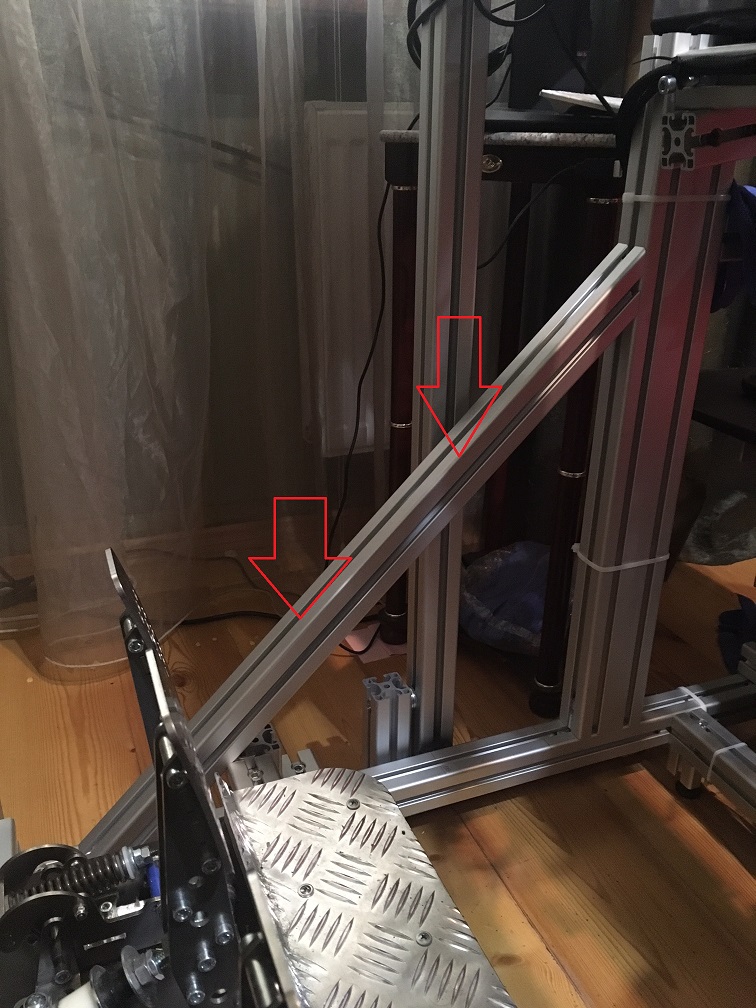
Ну если ты можешь прикрутить основание крепко к полу по 6-ти точкам хотябы, то хватит и 40х40. В противном случае одинарный профиль, тем более твой облегченный (да, мой поплотнее и потяжелее), на длинне ~1,5 м будет немного играть(изгибаться). Я вынужден был доделывать перемычки треугольником. Поэтому я тебе давно рекомендовал на низ брать двойной профиль. Не то, чтобы там сильный люфт был, нет, руль крепко стоял. Но когда я свои педали вижимал под 30-40 кг, у меня пол трещал ))). А сейчас мертво. А к хорошим педалям ты тоже рано или поздно прийдешь :) Вот Heusinkveld Engineering вообще ставят какой-то четвертной или пятирной профил, фиг сосчитаешь )))

-
На стойке под руль лично у меня 40*80 профиль и уголки соотвествующие, по 4 болта на уголок. Там геометрию не обманешь - чтобы угол регулировался, нужно предустмотреть смещение крепления.
-
Скорость по паспорту и в реале это разные вещи. Новая машина как правило едет быстрее паспортных данных, проверено много раз лично :). Тот же Ланос 1,5 по паспорту 172 км/ч, а разгонял до 180+ км/ч. Это новый. А на б/у W210 1,8 компрессор сколько его не тужил, он так и не набрал паспортную скорость, но там и пробег был под две сотни. Уже не говоря про то, что такие факторы, ка ветер, влажность, тепература, высота над уровнем моря, давление в шинах ... всё это влияет на макс скорость.
-
Да, сейчас как-то хлипенько )
-
Да, именно так. Дырки рассверлил так, как мне нужно было под определенный угол с небольшой регулировкой. Кроме уголка там с другой стороны ещё кусок профиля, который тоже выполняет роль уголка, но покрепче.
-
В смысле? Сразу по ссылке отправляет на #778.
-
Значит не надо. У меня там 7 мм. Потому и написал "возможно". В основном болты обыкновенные под внутренний шестигранник и Т-гайки. И вот такие http://forum.simracing.su/index.php?showtopic=989&st=760#entry184051
-
Сообщение не может быть отображено, т.к. оно находится в защищённом паролем форуме. Введите пароль
-
Ты сам сверлить собрался? :) Так то согласно чертежу и толщине "бороды" у прорези выбранного профиля. диаметр Ф14,7 От торца по идее 29-30. Но возможно еще нужно рассверливать профиль с торца под Ф11,7. зы. Я такие не использовал. Вообще у них специальные сверла под эти дела, а не обычные.
-
Жесть. Срочно заменить гравий на искусственный "безпыльный" :rolleyes:
-
Сообщение не может быть отображено, т.к. оно находится в защищённом паролем форуме. Введите пароль
-
Какие доводы? К чему доводы? С какой скоростью ездят гт3 ? Сам посмотри. Или доводы к тому, что куносы лепят машин побольше и это главное для них? Так я тебе уже написал, что это моё мнение, взгляд со стороны. Это всё-равно, что просить доводы о том, почему я считаю, что эта котлета вкусная Вроде всё просто, как дважды два.
-
А где ты увидел слово "Заявление" перед моим текстом ? Это и есть моё имхо, или по русски - моё мнение. И без всяких "типа". Это моё мнение как пользователя, то что я вижу со стороны. Твоё право быть несогласным. От этого моё мнение измениться не может.
-
Да я тольком то и не работал на трассе. Крылья с Сильвера остались, с другими не эксперементировал, нет времени толком.
-
Вильнёв четко сказал, почему Нико не должен был так поступать. Выше я привёл только часть цитаты, полный текст по ссылке. Я не то, что бы с ним согласен, я фактически тоже самое написал здесь после гонки. Очень неправильно думать, что раз ты впереди , то ты всегда прав и можешь смещаться куда угодно. Собственно сходы тех, кто был впереди это только подтверждают. Не всегда всё так однозначно на таких скоростях.
-
Да вот как-то пофигу, какие цифры они подгоняли, но гт3 выдают максималку больше, чем должны. Да и куносам тоже пофигу на всякие такие "мелочи", главное машинок побольше нарисовать.
-
Жак Вильнев: "Да, можно задаться вопросом, должен ли был Льюис действовать столь агрессивно, но если хотите назвать виновника аварии, то это на 100% Нико. Он начал смещаться, когда Льюис уже совершил свой маневр. Так поступать нельзя – это самое опасное и самое нечестное, что вы можете сделать в автоспорте. Поэтому с моей точки зрения, он на 100% неправ." http://www.f1news.ru/news/f1-112410.html
-
Вау! Это будет мега круто! МАло того, что Ле-Ман это уже бомба №2 после НШ, а может и на уровне имхо, так ЛМП1 это будет двойная бомба
-
Сообщение не может быть отображено, т.к. оно находится в защищённом паролем форуме. Введите пароль